If you use a printer in the U.S., you probably see 8.5 × 11-inch paper all the time. A4 looks almost the same, so mixing the two up is easy. They are not identical, though. A4 is a little narrower and taller, and that difference can affect margins, page layouts, and print files.
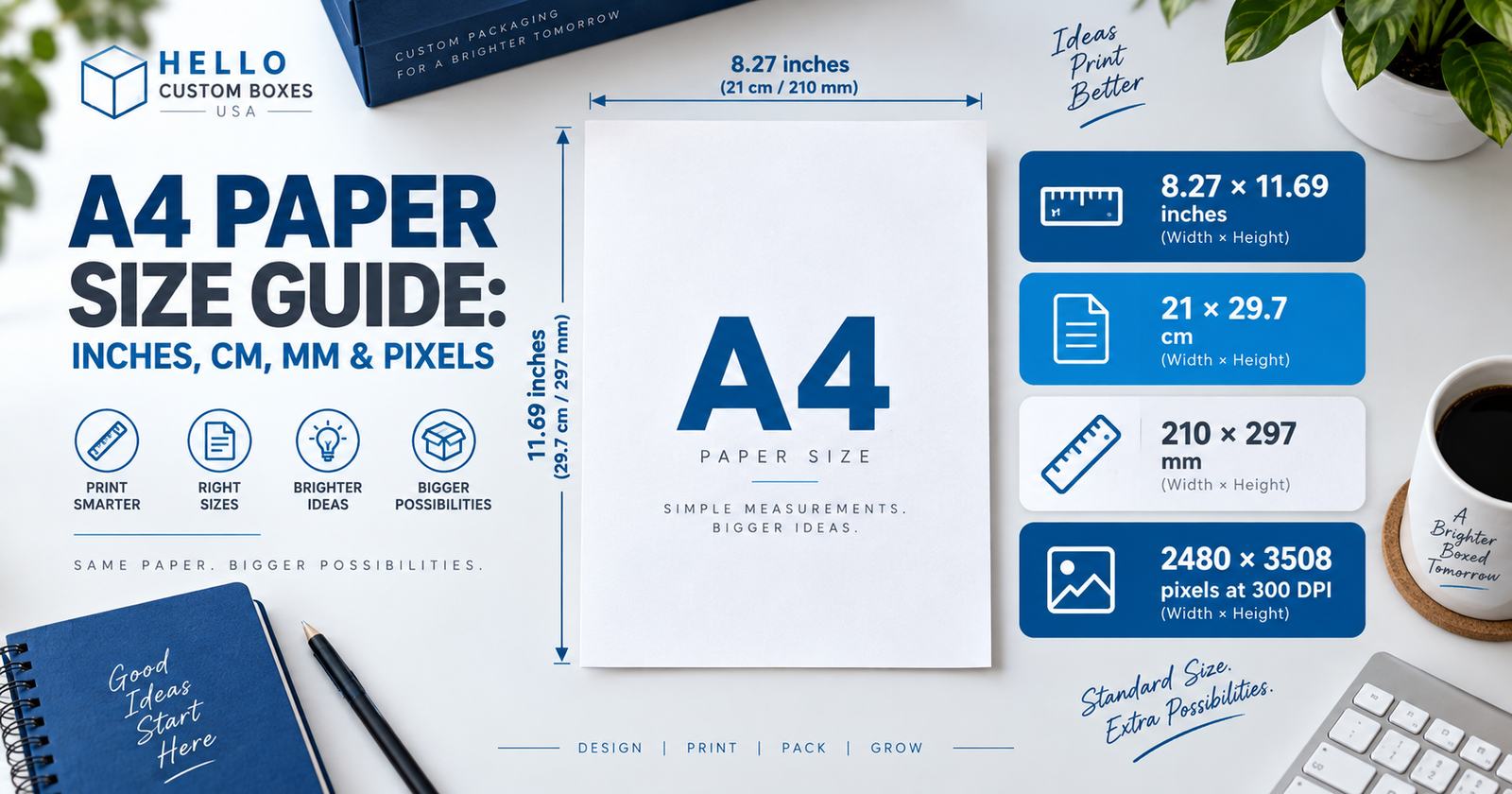
The standard A4 paper size is 210 × 297 mm, which is 21 × 29.7 cm or about 8.27 × 11.69 inches. Those measurements stay the same. Pixel dimensions are different because they depend on the resolution of the image or document.
A4 Dimensions in Inches, CM, MM and Pixels
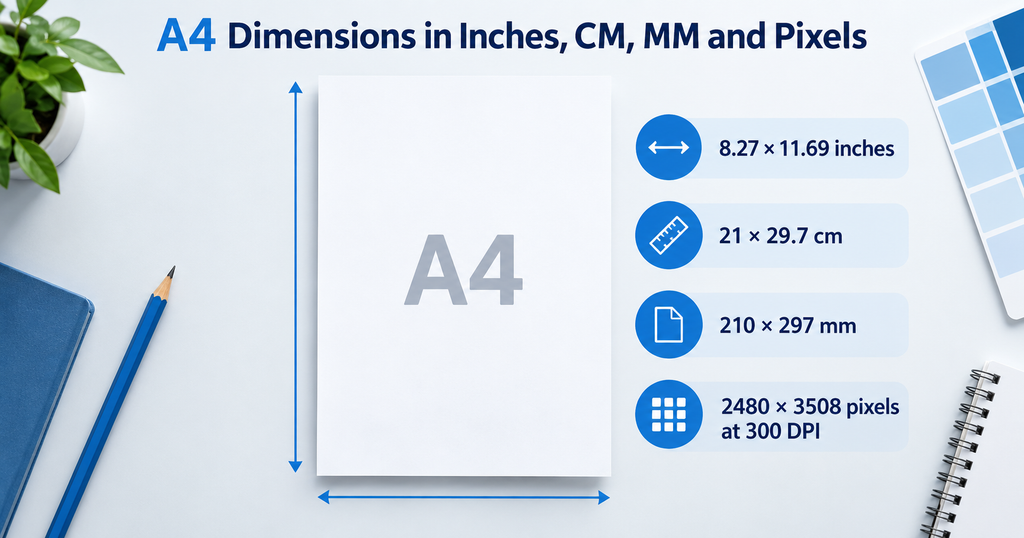
Here are the main measurements together. For most print work, the millimeter dimensions are the simplest reference because A4 is defined as 210 × 297 mm.
The inch measurements are rounded, so you may occasionally see a slight difference after conversion. That does not mean the paper size has changed.
Pixels are a separate matter. A4 does not have a fixed number of pixels until a resolution is chosen.
Is A4 the Same as 8.5 × 11?
No. The 8.5 × 11-inch sheet commonly used in the United States is U.S. Letter.
Here is how the two compare:
For an ordinary text document, the difference may not cause much trouble. A layout with tight margins, borders, forms, or graphics is less forgiving.
Suppose a document was created at A4 size but the printer contains Letter paper. The print settings may scale the page so everything fits. The result can still look acceptable, but the content will no longer be printed at exactly the size used in the original file.
When dimensions matter, check the page setting instead of assuming A4 and Letter are interchangeable.
What Is A4 Size in Pixels?
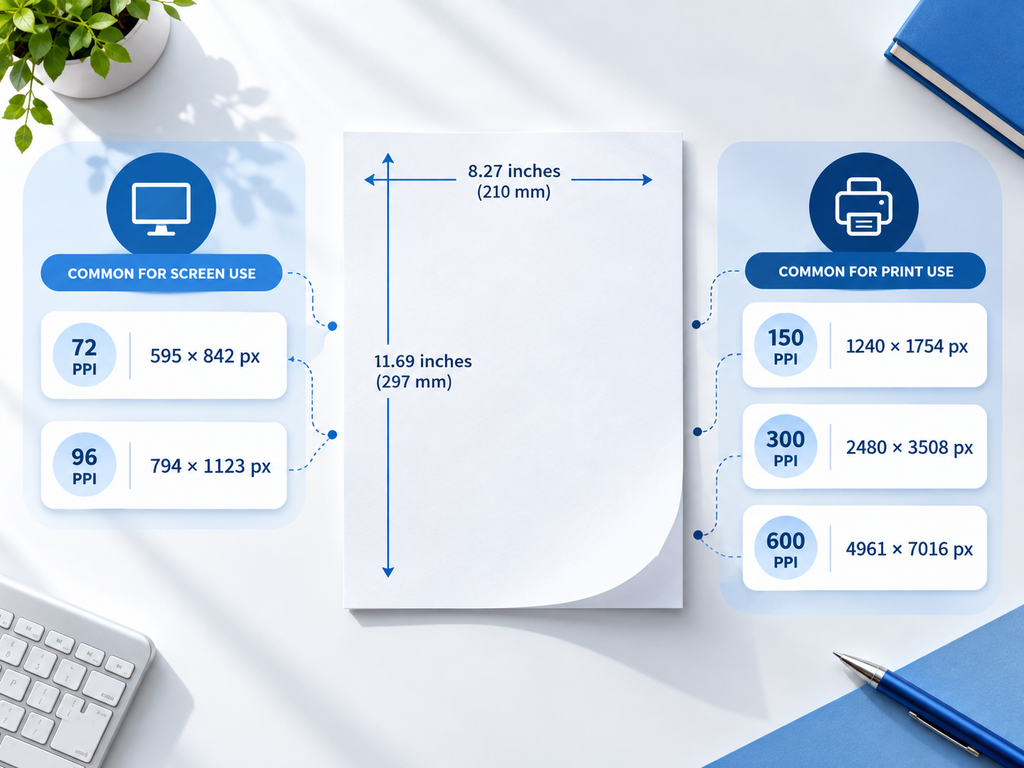
This depends on resolution.
A physical sheet has a measurable width and height. A digital image is made from pixels. The more pixels placed within each inch, the larger the pixel dimensions become even though the intended printed page remains A4.
At 72 PPI, the page is roughly 595 × 842 pixels.
At 150 PPI, it is about 1240 × 1754 pixels.
At 300 PPI, it reaches approximately 2480 × 3508 pixels.
For raster artwork being prepared for quality print, 300 PPI at the intended finished size is a common reference point. That does not mean every A4 document has to be 2480 × 3508 pixels. Text and vector graphics, for instance, do not work in quite the same way as raster photographs.
It is also worth checking the final print size. A photograph can look perfectly sharp on a laptop and still appear soft after being enlarged. Pixel count only becomes useful when you know how large the image will actually be printed.
Portrait and Landscape Are the Same Sheet
A4 in portrait orientation is 210 × 297 mm.
Turn the page sideways and it becomes 297 × 210 mm. Nothing about the physical sheet has changed; the width and height have simply swapped places.
This is useful to remember when setting up artwork. If a design needs a horizontal layout, switch the document to landscape rather than creating a different custom page size.
How A4 Relates to A3 and A5
A4 sits within the ISO A-series, alongside familiar formats such as A3 and A5.
The three sizes are:
- A3: 297 × 420 mm
- A4: 210 × 297 mm
- A5: 148 × 210 mm
There is a useful relationship between them. Cut an A4 sheet in half across its longer side and the result is two A5 sheets. Going the other way, two A4 sheets make up the area of an A3 sheet.
The proportions are maintained as the sizes change. This makes it easier to adapt a design between A-series formats without completely changing its shape.
Check the File Before Printing

A correct page size is a good start, but there are a few other settings worth checking before a file goes to print.
Confirm the orientation first. Then check the print dialog for automatic scaling. Options such as Fit to Page or Scale to Fit can be useful when the paper in the printer does not match the original document, but they also resize the content. If exact dimensions matter, make sure scaling is turned off or set intentionally.
For raster images, check the resolution at the size they will actually be printed. Artwork that reaches the finished edge may also need bleed beyond the trim line, depending on the printer’s specifications.
Color setup deserves a separate check for commercial work. Screens typically display RGB, while professional printing commonly uses CMYK workflows. Page dimensions and color mode are different parts of the file setup, but both can affect the finished result.
A4 and Packaging Artwork Are Different Things
A4 is a standard page format. A packaging dieline is built for a particular box.
That distinction matters when artwork is being prepared for custom packaging. A flat dieline can include the front, back, side panels, flaps, folds, and cut areas. Its overall dimensions come from the finished box structure.
It might happen to fit on an A4 sheet. Often it will not.
Production artwork should therefore follow the approved dieline instead of being reduced or stretched to fit A4. An A4 sheet can still be useful for printing a reference copy or proof, but it should not determine the dimensions of the actual packaging design.
For packaging work, start with the box size and structure. The artwork comes after that.
People Also Ask About A4 Paper Size
Keep the Original Size in Mind
The easiest A4 measurement to remember is 210 × 297 mm. From there, it converts to 21 × 29.7 cm or approximately 8.27 × 11.69 inches.
For U.S. users, the main thing to watch is the difference between A4 and Letter. They look close, but a small size difference can matter when margins, artwork placement, or print dimensions need to stay accurate.
Packaging artwork is a different case. Start with the finished box dimensions and approved dieline rather than trying to make the design fit an A4 page. The artwork should follow the package that will actually be produced.